User login stage
The User Login stage attaches the current pending_user to a new authentik session.
Overview
This stage is usually the final stage in authentication, enrollment and recovery flows, signing the user in immediately upon success.
Configuration options
- Session duration: how long the created session should last. A value of
seconds=0keeps the session until the browser session ends. - Network binding: optionally bind the session to ASN, network, or IP-derived network information.
- GeoIP binding: optionally bind the session to continent, country, or city information.
- Terminate other sessions: revoke the user's other active authentik sessions when this stage succeeds.
- Remember me offset: extend the session when the user explicitly chooses the remember-me option. A value of
seconds=0hides the option. - Remember device: store a longer-lived cookie that helps authentik recognize a known device on later sign-ins.
Flow integration
Use this stage near the end of flows that should create an authenticated browser session.
Common placements include:
- after a Password or Authenticator Validation stage in authentication flows
- after a User Write stage in enrollment flows
Notes
Browsers handle session cookies differently. A session configured with seconds=0 is intended to end when the browser session ends, but some browsers can retain session state longer.
Duration fields use the standard authentik timedelta syntax such as hours=1,minutes=30,seconds=0.
All values accept floating-point numbers.
Valid keys in those duration strings include:
-
microseconds
-
milliseconds
-
seconds
-
minutes
-
hours
-
days
-
weeks
-
If Remember me offset is greater than
seconds=0, authentik shows the user a Remember me on this device option during login.
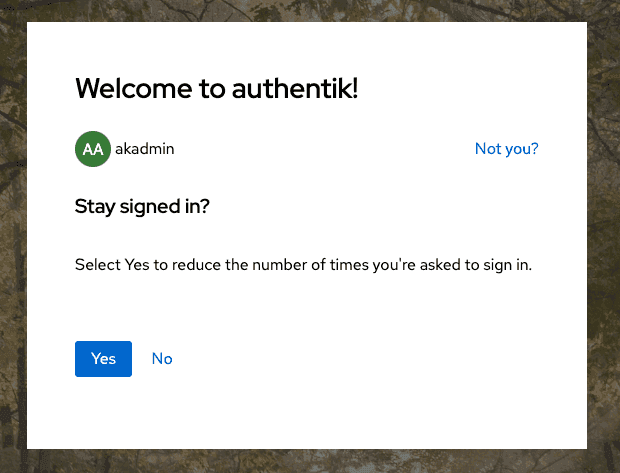
- If Remember device is enabled, authentik stores a cookie that can be used in later flows or policies to distinguish known from unknown devices.
- If the user already has another authenticated session from the same IP address, authentik also classifies that sign-in as coming from a known device.
- If Network binding or GeoIP binding is enabled, authentik terminates sessions that later violate the selected binding.
When a session is terminated because a binding is broken, the generated logout event includes additional binding data describing what changed.
{
    "asn": {
        "asn": 6805,
        "as_org": "Telefonica Germany",
        "network": "5.4.0.0/14"
    },
    "geo": {
        "lat": 51.2993,
        "city": "",
        "long": 9.491,
        "country": "DE",
        "continent": "EU"
    },
    "binding": {
        "reason": "network.missing",
        "new_value": {
            "asn": 6805,
            "as_org": "Telefonica Germany",
            "network": "5.4.0.0/14"
        },
        "previous_value": {}
    },
    "ip": {
        "previous": "1.2.3.4",
        "new": "5.6.7.8"
    },
    "http_request": {
        "args": {},
        "path": "/if/admin/",
        "method": "GET",
        "user_agent": "Mozilla/5.0 (Macintosh; Intel Mac OS X 10_15_7) AppleWebKit/537.36 (KHTML, like Gecko) Chrome/120.0.0.0 Safari/537.36"
    },
    "logout_reason": "Session binding broken"
}
For alerting and policy use, authentik can also classify a login as coming from a known or unknown device based on the "Remember me on this device" cookie and related session information.
See the notification policy examples for logins from unknown devices.
When Terminate other sessions is enabled, previous authentik sessions for the same user are revoked. This does not affect OAuth refresh tokens.